


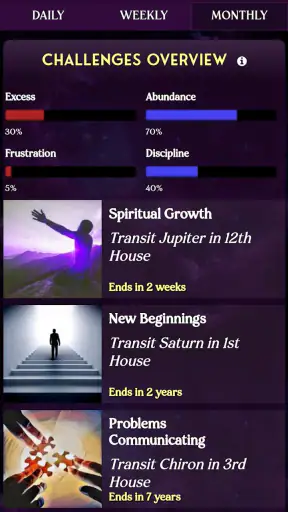
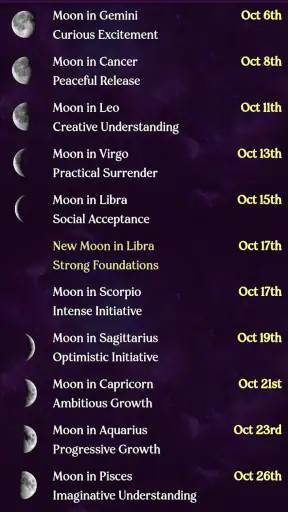
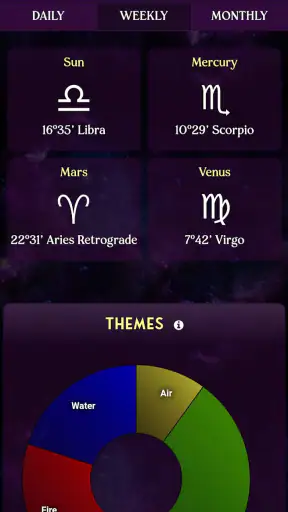
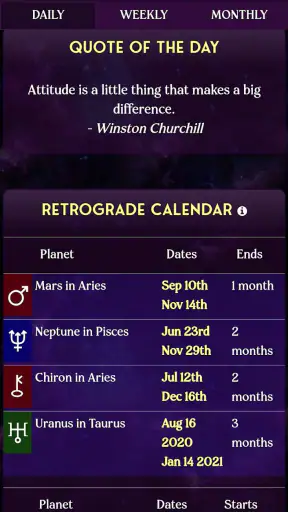

I approached AstroMatrix Birth Horoscopes as a lifestyle app for people who enjoy astrology as a reflective tool rather than as a replacement for practical advice. Its focus is personal: birth charts, relationship comparisons, tarot, and daily horoscope material are gathered in one place instead of being scattered across several specialist apps. That combination makes the first few sessions feel more substantial than simply checking a short zodiac message.
What stood out to me is that the app encourages a slower kind of reading. A daily horoscope can be consumed in a few seconds, but a birth chart asks you to move between symbols, placements, and interpretations. I found that difference important because it changes the app from a quick entertainment feed into something I could return to when I wanted to think through a mood, a relationship, or a recurring personal question.
How the astrology experience works in everyday use
The app is developed by AstroMatrix and sits in the lifestyle category. It is free to start, with optional in-app purchases ranging from $1.49 to $49.99 per item. That setup is useful for curious newcomers because I could explore the general experience before deciding whether deeper material was worth paying for. It also means I had to pay attention to which parts of the experience were immediately available and which encouraged a purchase.
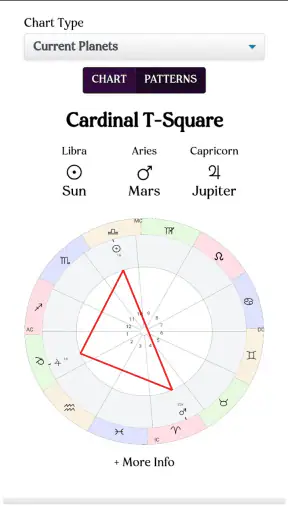
The central attraction is the personalized birth chart. Rather than treating everyone with the same sun sign as identical, the chart gives the experience a more individual frame. I found this more engaging than the usual newspaper-style horoscope because it gave me several areas to consider instead of one broad sentence. For a first-time user, though, the number of symbols and interpretations can feel dense. The app rewards patience, and it is not the best choice if you want astrology reduced to one clear instruction each morning.
The synastry chart adds a relationship angle. I would use it as a conversation starter when comparing two people, not as a final judgment about compatibility. That distinction matters. A chart can offer language for discussing different tendencies, communication styles, or emotional reactions, but it should not decide whether a friendship or romance is healthy. In my view, the feature is most useful when both people treat it as a prompt for curiosity rather than a verdict.
Tarot gives the app another way to approach reflection. I liked having a symbolic option for moments when I did not want to study a full chart. At the same time, tarot readings are easy to overinterpret when someone is anxious and looking for certainty. I would read a result, note what it brings to mind, and then return to the actual situation in front of me. That habit keeps the feature enjoyable without handing it too much authority.
Where the internet becomes part of the experience
Connectivity shapes how smoothly this kind of app feels. Daily horoscope content is naturally something I expect to refresh, and chart or tarot material can involve loading screens before the reading becomes available. When the connection is stable, the transition from opening the app to reading feels straightforward. When the network is slow, the reflective mood can be interrupted by waiting, especially if I open it during a short break.
This matters more than it might with a simple notes app. With notes, I can usually open an existing page and continue immediately. Astrology content often depends on the app presenting calculations or interpretations at the moment I request them. I therefore found it better suited to a connected morning routine than to a place where I already know I will have unreliable reception.
A realistic example is checking the app on a commute. If I have a dependable mobile connection, I can look at the daily material, save a thought mentally, and close it before arriving. If the train moves through weak-signal areas, the experience becomes less predictable. I would not plan an important personal ritual around that moment. Instead, I would open the app at home, while connected, and use the commute for thinking about what I had already read.
The same issue appears when comparing charts. Synastry is not something I usually rush through, so a delayed result is not disastrous, but it does break concentration. My practical tip is to prepare the relevant birth details before starting rather than searching through messages or contacts while the app is open. That reduces the number of interruptions and makes the comparison feel more deliberate.
Using it comfortably on a phone
Astrology is a surprisingly mobile-friendly subject because the phone makes private reflection easy. I could read a horoscope while having coffee, examine a chart alone, or use tarot without announcing to everyone nearby what I was doing. The small screen is convenient for short sessions, especially when I only want one interpretation or a quick daily check.
Longer chart reading is different. Moving between dense information and explanatory text on a phone can become tiring, particularly if I try to absorb everything in one sitting. I recommend treating the chart as a series of visits: look at one area, write down what feels relevant, and return later. That approach is more useful than scrolling until the symbols blur together.
The app is also better for personal exploration than for showing a chart to a group. A phone screen can make a shared reading awkward, and the meaning of a chart is not always obvious to someone seeing it for the first time. If your main goal is to present detailed astrology to other people, a larger-screen service may be more comfortable. For private use, however, the phone format keeps the experience discreet and easy to fit into ordinary routines.
I would also avoid opening it in situations where I need an immediate answer. The app encourages interpretation, and interpretation takes attention. Using it while walking, driving, or handling a busy task would be poor judgment. Its best mobile context is a quiet pause when I can read without treating every sentence as an urgent instruction.
What happens when a session is interrupted
Network interruptions are not the only source of friction. A phone call, a switch to another app, or an accidental close can break the rhythm of a reading. I learned to approach longer sessions with a simple recovery habit: remember the topic I was examining before leaving the screen, then return to that topic rather than starting a completely different feature.
This sounds minor, but it prevents a common problem with astrology apps: collecting fragments without forming a useful reflection. If a chart view is interrupted, I would not try to reconstruct every detail from memory. I would note the question I had in mind, reopen the relevant area when possible, and continue from there. That keeps the app from becoming a stream of disconnected predictions.
Daily content is easier to recover from because it is naturally brief. Missing a morning check does not make the rest of the day unusable. I could read it later and treat it as a prompt for the day I was actually having. That flexibility is one of the reasons I prefer the app to rigid spiritual routines that make users feel they have fallen behind.
Tarot requires a little more care after an interruption. If I leave halfway through a reading, I would avoid drawing additional conclusions simply to replace the first impression. The better approach is to wait until I can concentrate and then review the original question. In this way, the app becomes a reflective exercise rather than a search for repeated reassurance.
Being sensible with personal and relationship details
Birth-chart and synastry experiences naturally involve personal information. I would think carefully before entering another person’s details, particularly when using the relationship feature as part of a private conversation. Even when the purpose is harmless, it is respectful to make sure the other person is comfortable with their information being used for an astrology reading.
I also recommend avoiding unnecessary oversharing in any notes or questions connected to the experience. The most useful astrology prompt is usually specific enough to guide reflection but not so detailed that it becomes a diary of sensitive events. For example, asking myself how I am handling a change in a relationship is more sensible than recording every private message or argument.
Connectivity adds another reason to be intentional. When an app needs to load content, I prefer using it on a trusted connection rather than an unfamiliar public network, especially if I am entering personal details. I am not suggesting that every public connection is unsafe; I simply find that a little caution is worthwhile when an app’s purpose is tied to identity, relationships, and personal reflection.
The free entry point helps with data-conscious use because I can explore without immediately committing to a purchase. Still, the presence of optional purchases means I would review each purchase screen carefully and decide whether a feature genuinely adds value to my routine. A paid interpretation is not automatically more useful than a free one if I have not yet developed a clear reason for wanting it.
How it compares with simpler horoscope alternatives
Compared with a basic daily-horoscope app, AstroMatrix feels broader and more personal. A simple alternative may be better if all I want is a fast zodiac message with no setup and no learning curve. I can open such an app, read a few lines, and move on. AstroMatrix asks for more attention, but in return it gives me several ways to explore astrology beyond the daily sign.
Compared with a standalone tarot app, its advantage is variety. I do not need to move between separate tools when I want to shift from a chart to a card-based reflection. The trade-off is that a dedicated tarot app may feel more focused for someone who only cares about readings. The same pattern applies to synastry: a specialist relationship astrology service might provide a more concentrated workflow, while this app is more convenient for someone who wants multiple features in one place.
I also see a difference between this app and general journaling. A journal lets me describe events in my own words, while AstroMatrix gives me symbolic structures to react to. For me, the strongest routine combines both: read one relevant interpretation, then write a plain-language note about what actually happened. That prevents the astrology from floating free of real experience and makes it easier to notice whether the exercise is helping.
Who will get the most from it
I think the app suits people who enjoy learning the language of astrology gradually. It is particularly appealing if you want a birth chart for personal exploration, a synastry view for thoughtful relationship conversations, and tarot or daily material for shorter sessions. Having those options together makes it easier to match the tool to your mood.
It is also a reasonable starting point for someone who has only used generic horoscopes. The free access lowers the barrier to trying it, and the age rating of Everyone makes the app broadly approachable. Even so, younger users and anyone feeling vulnerable should be reminded that astrology and tarot are interpretive entertainment or reflection tools, not professional medical, financial, legal, or mental-health guidance.
I would skip it if you want strictly evidence-based explanations, guaranteed predictions, or a completely offline experience. I would also choose a simpler alternative if I know I will only read one short horoscope and never explore a chart. The extra depth is valuable only when I am willing to spend time with it. Otherwise, the additional material can feel like clutter rather than a benefit.
What the current release means for new users
The app has been available since November 3, 2015, and the current version is 10.9.8. Its minimum operating-system requirement is Android 7.0, which makes it accessible on many older Android phones while still leaving the experience dependent on how well that particular device handles modern app content and network activity.
Its established presence is reflected in the scale of its audience: it has more than a million installs, an average rating of 4.6 from around thirty-one thousand ratings, and about eight thousand written reviews. I do not treat those figures as proof that every interpretation will suit me, but they do suggest that the app has found a substantial audience beyond casual experimentation.
For a new user, I would begin with one clear goal rather than opening every section at once. Start with the birth chart if personalization is the main attraction. Try daily material if you want a short habit. Move to synastry only when you have a real relationship question to discuss, and use tarot when you want a symbolic prompt rather than a definitive answer. This order makes the app easier to understand and reduces the temptation to chase every available reading.
My connectivity verdict
AstroMatrix works best when I treat connectivity as part of the planning rather than an invisible guarantee. A stable connection makes daily refreshes, chart exploration, and relationship comparisons feel smoother. A weak connection does not necessarily ruin the experience, but it can turn a calm reading into a stop-and-start session. I would use it at home or in another dependable setting for longer work, and reserve mobile checks for short moments when I know the network is reliable.
Overall, I find the app worthwhile for reflective astrology fans who want more than a generic horoscope. Its strongest quality is the way birth charts, synastry, tarot, and daily readings support different levels of attention. Its main weakness is that the breadth can overwhelm newcomers, while network interruptions and optional purchases add friction to an experience that is supposed to feel personal and relaxed.
My recommendation is to try it slowly, keep your expectations grounded, and judge it by whether it helps you think more clearly rather than whether a prediction comes true. If that is the kind of relationship you want with astrology, the free starting point makes AstroMatrix easy to explore. If you want instant answers, minimal reading, or a tool that works independently of connectivity, a simpler alternative will probably suit you better.


